
See a real result before you buy.
This is one complete Oral Balance result: the app and the six-page report it produces, from the same sample. The person is fictitious; the layout and the logic are exactly what you receive. This one came back with findings in it.
Both open in a new tab. The Reference Guide is the companion to every report: how to read each score, key terms, and the research behind the panel. Nothing on this page is a real patient's result.
What your result shows
-
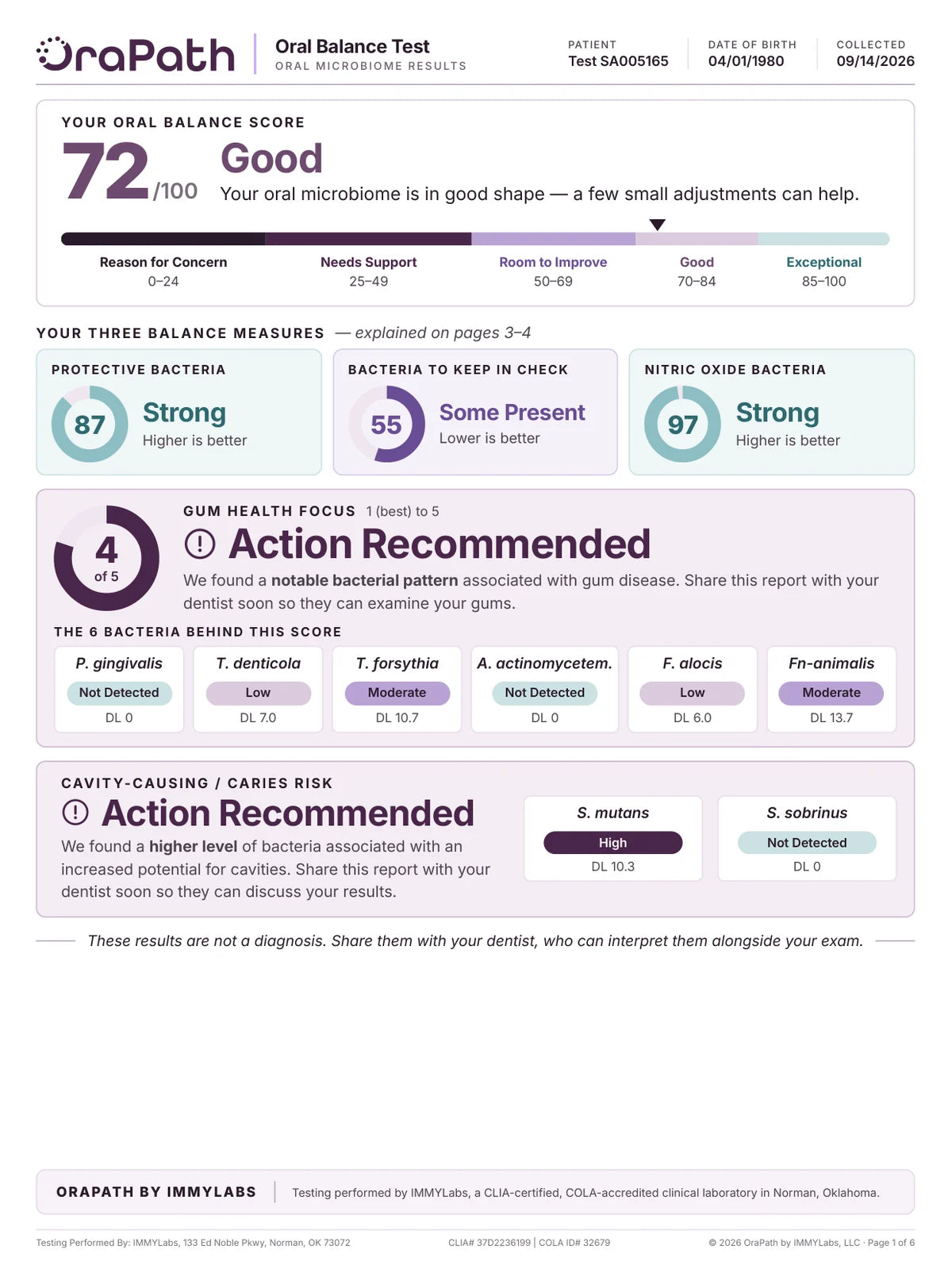
Your score, gum health and cavity risk, on one page -
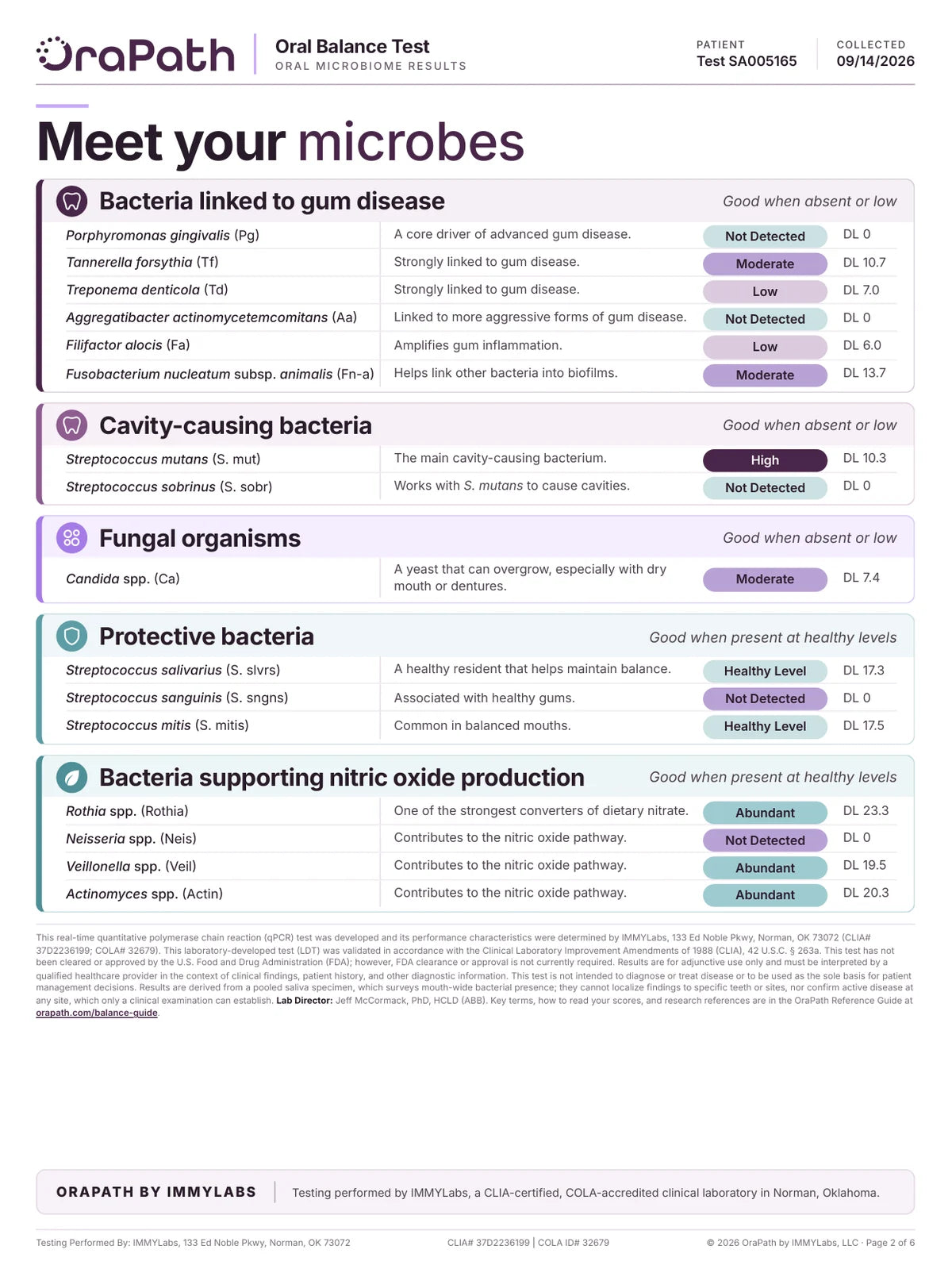
All sixteen organisms, each with its level -
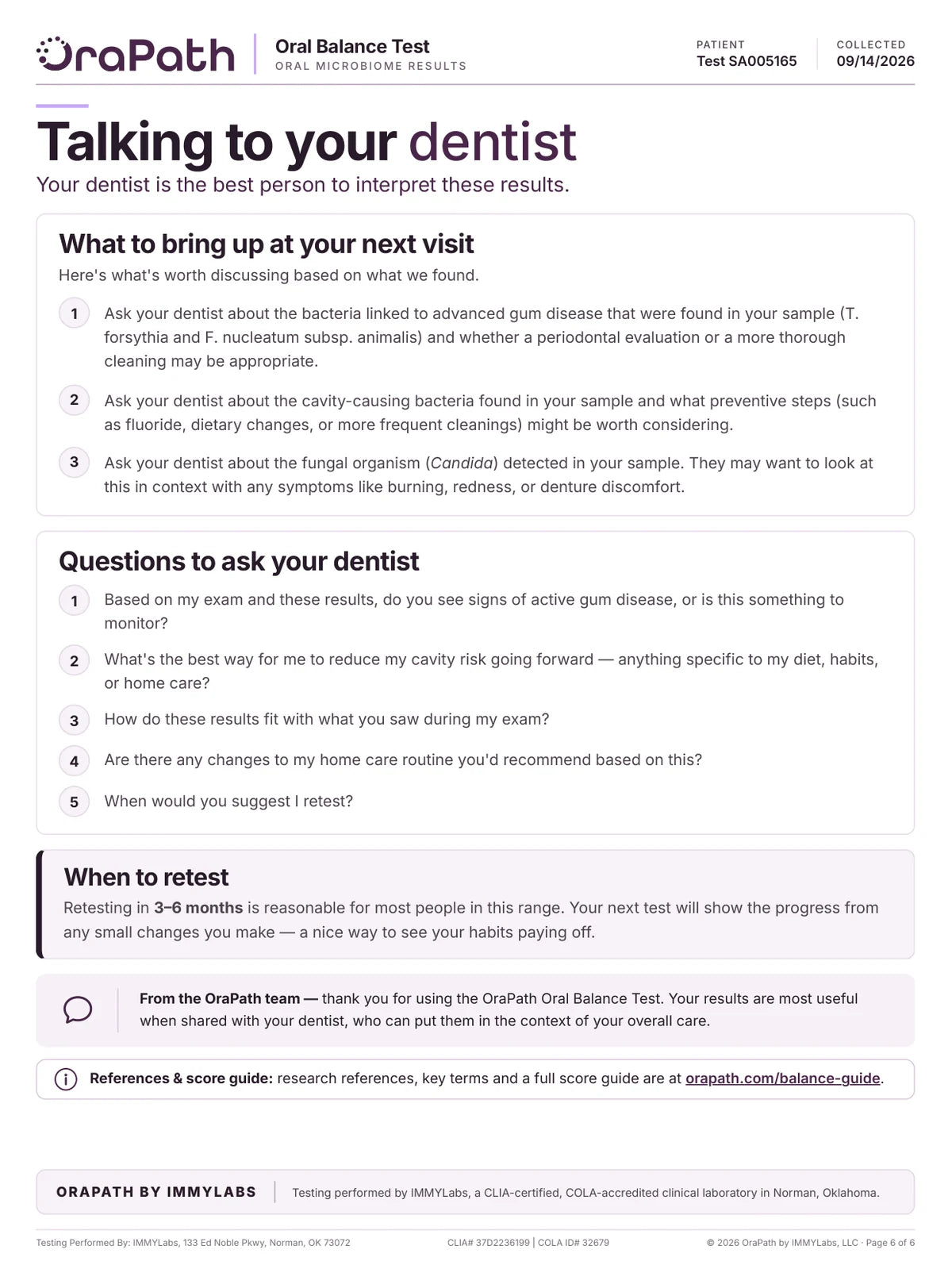
What to raise with your dentist, from your own result

Your result, the moment it lands
Where do my results show up?
The dashboard opens on your Oral Balance Score — 72 out of 100 here, Good — with a one-line summary, then the three balance measures, each with its own score and label, and your Gum Health Focus underneath. It is the same result as the six-page report, from the same sample, and every tile opens into the detail behind it.
What to look at
- The score, the band, and a one-line summary
- Protective Bacteria, Bacteria to Keep in Check and Nitric Oxide Bacteria, each scored
- Your Gum Health Focus, 1 to 5
- Every tile opens into the detail behind it

The gum-health finding, opened up
What is behind my gum health score?
Tap the Gum Health Focus and you get the score on its 1-to-5 scale, a plain statement of what it means, and the six bacteria it is built from. Each one shows its full name, a one-line note on what it does, its category and its Detection Level on a slider, so you can see where it sits rather than read a bare number.
What to look at
- Where the score sits on the 1-to-5 scale
- The six bacteria behind it, by name
- A category and a Detection Level for each, on a scale
- What to do next: share it with your dentist

Which bacteria, specifically
Which of my bacteria are the ones to watch?
Each balance measure has its own screen. This one scores the bacteria associated with gum disease, cavities and yeast overgrowth — lower is better — and names the ones behind this sample's result. The groups underneath open to every organism in them, including the ones that were not detected.
What to look at
- The score, with which direction is good
- The organisms behind the result, named
- Groups that open to every organism, detected or not

The helpful side, scored too
Is anything in my mouth already helping?
Most oral tests count only what is wrong. The app scores the helpful side as well: here, the bacteria that help turn nitrate from food into nitric oxide, at 97, Strong. Each organism is listed with what it contributes and where its level sits, and further down the same screen walks through the pathway step by step.
What to look at
- A score where higher is better
- Each organism, with what it contributes
- Where each level sits on its scale
- The nitrate-to-nitric-oxide pathway, step by step

All sixteen, grouped and tappable
Can I see everything, not just the summary?
The full panel, in groups, with the category legend spelled out at the top: for bacteria linked to disease, lower is better; for helpful bacteria, present or healthy levels are a good sign. Each group says which direction is good and opens to the organisms inside it.
What to look at
- The category is the result; the Detection Level is the amount
- A separate legend for disease-linked and helpful bacteria
- Tap any group to open the organisms inside

Associations, with their basis shown
Does any of this matter outside my mouth?
Some organisms on the panel have been associated in published research with health elsewhere in the body. Each card names the organisms in your own sample that relate to it and carries an evidence label, and the areas nothing in your sample raised are listed too. These are associations reported in research, not a diagnosis or a personal risk score.
What to look at
- Every card names the organisms behind it
- Well-established, supported or emerging, labeled on each
- What your sample did not raise is stated as plainly as what it did
- How long it has been since your last test

Ready for your next appointment
How do I use this with my dentist?
Next Steps turns the result into things to raise at your next visit, each drawn from what was found in this sample — here, the gum-disease-linked bacteria, the cavity-linked bacteria and Candida — followed by questions to ask and when to retest. Your dentist is the person who can decide what is appropriate after an exam.
What to look at
- Topics drawn from your own findings
- Questions to take to the appointment
- When to retest
- Everyday habits, labeled as care rather than treatment

Every test, on one timeline
Will I be able to see change over time?
One result describes a single day; the comparison is where the value builds. Trends charts each score across your tests, with the change since your last one, and lists every test you have taken. In this sample account the earlier tests are demonstration data, labeled as such in the app — yours fill in as you retest.
What to look at
- Each score charted across tests
- The change since your last test
- Every test listed, latest first
- Demonstration data, clearly labeled, until your own tests replace it
Your result, as a report you can hand over
The app is where your result lives day to day. The PDF is the version you print or email — six pages, laid out for a dentist reading it in an appointment, with the reasoning written out rather than tucked behind a tap. Every page below comes from the same sample as the screens above.
Your whole result, on one page
What did the test actually find?
The report opens with your Oral Balance Score on a 0–100 scale and the band it falls in — 72, Good, in this sample. Under it sit the three balance measures it is built from, then the two findings most worth taking to a dentist: a Gum Health Focus from 1 to 5, with the six bacteria behind it, and a cavity-risk reading based on S. mutans and S. sobrinus. A good overall score can still carry a finding, and this one does.
What to look at
- The score, and which of the five bands it sits in
- Protective Bacteria, Bacteria to Keep in Check and Nitric Oxide Bacteria, each saying which direction is good
- A Gum Health Focus of 4 out of 5, with the six bacteria behind it
- A cavity-risk finding, shown with the two organisms it is based on
Every organism, by name
What exactly did you measure?
All sixteen targets, in five groups: bacteria linked to gum disease, bacteria linked to cavities, Candida, protective bacteria, and the bacteria that support nitric oxide production. Each organism gets its full name, one line on what it does, a category and a Detection Level. Every group says which direction is good, so no result has to be read without it.
What to look at
- Sixteen organisms in five groups
- Good when absent or low, or good when present, stated on every group
- A category first, the Detection Level beside it
- A one-line note on what each organism does

Each score, explained in plain terms
What do these numbers actually mean?
This page takes the scores one at a time. For each it says what the bacteria are, why they matter, and what this sample's result means — Protective Bacteria at 87, Strong, and Bacteria to Keep in Check at 55, Some Present, with the organisms behind that finding named. Higher is better for one and lower is better for the other, and the page says so each time.
What to look at
- The overall score, in a sentence
- What these are, why they matter, your result: for each measure
- The organisms behind a finding, named
- Which direction is good, stated every time

The nitric oxide pathway, and where to start
Is there anything I can do myself?
The top half explains the bacteria on your tongue that help turn nitrate from food into nitric oxide, in three steps, and where this sample sits: Strong. The bottom half is a short list of everyday oral-care habits chosen from this result — the gumline, sugar timing, and a habit aimed at Candida — labeled as habits, not treatment. Your dentist may recommend more after an exam.
What to look at
- Food to nitrite to nitric oxide, in three steps
- Your nitric oxide result, in plain terms
- Habits chosen from your own findings
- Labeled as everyday care, not treatment

Associations beyond the mouth
Does any of this matter outside my mouth?
Some bacteria on the panel have been associated in published research with health elsewhere in the body. The areas your own sample relates to come first, each naming the organisms behind it, and the areas nothing in your sample raised are still listed. Every area carries an evidence label, and the page says plainly that these are associations reported in research — not a diagnosis, and not a personal risk score.
What to look at
- Areas with a finding come first, each naming the organisms behind it
- Areas your sample did not raise are shown too
- Well-established, supported or emerging, labeled on each
- Associations throughout, never cause, never a personal risk score
What to take to your dentist
How do I use this at my next appointment?
The last page turns the result into a conversation. It lists what is worth raising based on this sample — here, the gum-disease-linked bacteria, the cavity-linked bacteria and Candida — then five questions to ask, and when to retest. It is the page most worth printing: your dentist is the person who can read these results against an actual exam.
What to look at
- What to raise, drawn from this sample's findings
- Five questions to ask at the appointment
- When to retest, and why
- References and key terms in the companion Reference Guide
The Oral Balance Test is a laboratory-developed test performed by IMMYLabs (CLIA #37D2236199; COLA #32679), validated under CLIA, 42 U.S.C. § 263a. It has not been cleared or approved by the U.S. Food and Drug Administration. Results are semi-quantitative, describe a pooled saliva sample rather than any individual tooth or site, and are for adjunctive use — they support a dentist's examination rather than replace one, and nothing in the report or the app is a diagnosis.
You've seen the report. Now get your own.
One saliva sample, collected at home in about two minutes. Your own version of this report lands in your private OraPath account about a week later — and it's yours to take to your dentist.
Results in your private OraPath account · not a diagnosis — meant to be reviewed with your dentist alongside an exam.